Guides
Glassmorphism vs Liquid Glass: What Actually Changed
Glassmorphism blurred the background. Liquid glass bends it. A side-by-side look at the two styles, when to use each and how the CSS differs.
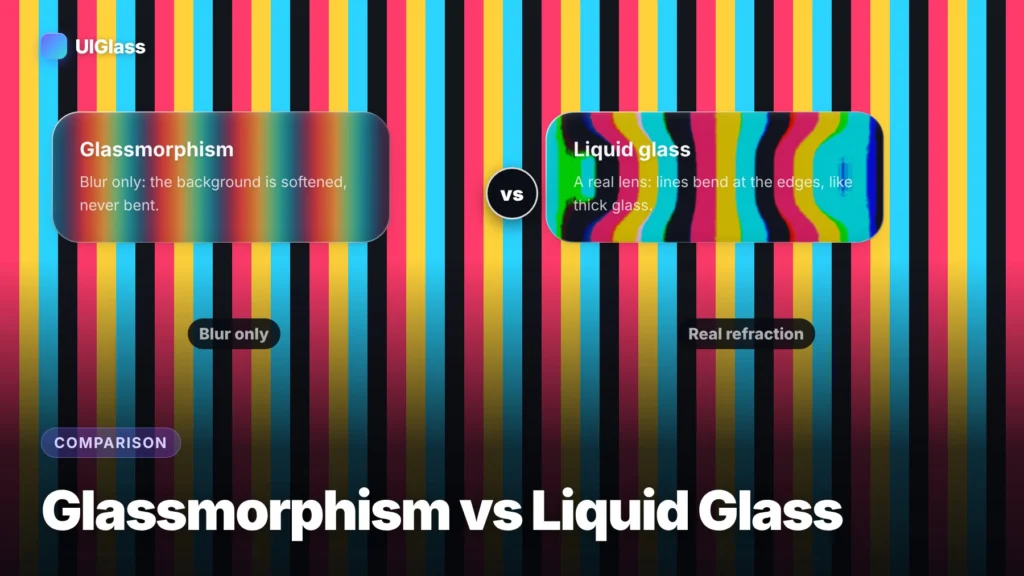
In short: Glassmorphism blurs the background behind a surface. Liquid glass also bends it at the edges like a lens, adds directional light and reacts to interaction. Glassmorphism works in every modern browser, while liquid glass refraction on the web currently renders in Chromium browsers.
Both styles put a translucent surface above content, so they are easy to confuse. The difference is in how the surface treats what is behind it — and in how much physical detail it carries.
Side by side
| Glassmorphism | Liquid glass | |
|---|---|---|
| Background | Blurred, often heavily | Lightly blurred or clear |
| Edges | Flat, 1 px white border | Curved bezel that refracts |
| Light | Generic white border or gradient | Rim light, inner glow and caustic from one light direction |
| Depth | Soft drop shadow | Shadow plus internal shading |
| Motion | Usually static | Lifts, compresses, sweeps light |
| Main CSS tools | backdrop-filter: blur() | Backdrop filter + SVG displacement + layered shadows |
Glassmorphism in one rule
Classic glassmorphism is mostly this:
.glass {
  background: rgb(255 255 255 / .15);
  backdrop-filter: blur(16px);
  border: 1px solid rgb(255 255 255 / .3);
  border-radius: 16px;
}
It is cheap to render, works in every modern browser and reads instantly as “glass” — but it is also flat. The heavy blur hides the background so completely that the surface could just as well be frosted plastic.
What liquid glass adds
Liquid glass keeps the background visible and bends it near the edges. That requires a displacement map — an image that tells the browser how far to shift each pixel — applied through an SVG filter. The surface also gains a light model: highlights and shading that agree on where the light comes from. Finally, it moves: interaction states are part of the material, not an afterthought.
When to use which
Choose glassmorphism when you need maximum compatibility and minimum cost: large panels, sidebars, cards in data-heavy dashboards, or interfaces with many translucent layers at once.
Choose liquid glass for a few hero surfaces where material quality matters: primary buttons over imagery, floating navigation, media controls and onboarding screens.
You don’t have to pick one globally. A common pattern is liquid glass for interactive controls and quieter frosted glass for large containers.
Progressive enhancement makes it safe
Because SVG refraction inside backdrop filters is currently rendered by Chromium-based browsers only, a good liquid glass component always contains a well-designed frosted version underneath. Browsers that can’t render the lens simply show that version. The browser support page explains how UIGlass exports handle this.
Frequently asked questions
What is the difference between glassmorphism and liquid glass?
Glassmorphism blurs the background behind a translucent surface. Liquid glass also bends the background at the edges like a lens, adds a directional light rim and reacts to interaction.
Is glassmorphism outdated?
No. Glassmorphism is still a clean, widely supported style. Liquid glass is a richer evolution of it, not a replacement for every use.
Can I turn glassmorphism into liquid glass?
Yes. Lower the blur, add a gradient rim with a light angle, and add an SVG displacement filter applied with backdrop-filter: url() in Chromium browsers. Keep the glassmorphism version as the fallback.
Which is better for performance, glassmorphism or liquid glass?
Glassmorphism is slightly cheaper because it has no displacement pass. On small components the difference is negligible. On large panels, both need care. See the performance guide.
Does liquid glass work in all browsers?
The frosted part works in all modern browsers. Refraction currently renders in Chromium browsers. Safari and Firefox show the glassmorphism fallback. See liquid glass in Safari and Firefox.
Is Apple’s Liquid Glass glassmorphism?
No. Apple’s Liquid Glass is a native material that refracts and reflects light and morphs between controls. It goes well beyond the blur-and-border look of glassmorphism. Read Apple Liquid Glass explained.
Try both
In the UIGlass builder, set Refraction → Strength to 0 and Frost to 16 px for classic glassmorphism. Then lower the frost to 4 px and raise the strength to 40 px: that’s the jump from blur to bend.


