Tutorials
Liquid Glass in Safari and Firefox: Why Refraction Fails and 4 Fallbacks That Work
Why liquid glass refraction works in Chrome but not in Safari, iOS or Firefox, how to detect it properly, and four fallback strategies, from a polished frosted version to refracting a copy of the background.
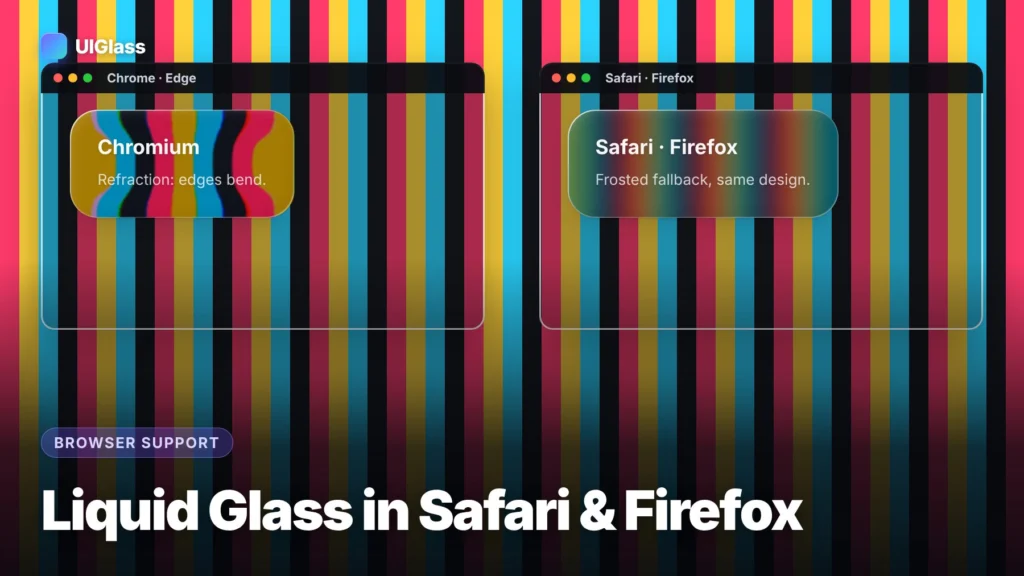
In short: Liquid glass refraction fails in Safari and Firefox because they don’t render SVG filters inside backdrop-filter. Blur still works. Detect Chromium, apply the url() filter only there, and give other browsers a polished frosted fallback or refract a copy of the background instead.
You build a liquid glass component, it looks stunning in Chrome, and then someone opens it on an iPhone: the edges are flat, or the whole effect is gone. This is the most common liquid glass problem on the web. It isn’t a bug in your code. It’s a gap in browser support.
This guide explains exactly what fails, how to detect it, and four ways to handle it.
What works where
Liquid glass on the web combines two features with very different support:
| Feature | Chrome / Edge / Opera / Samsung | Safari (macOS, iOS) | Firefox |
|---|---|---|---|
backdrop-filter: blur() saturate() | Yes (Chrome 76+) | Yes (prefixed for years; unprefixed since Safari 18) | Yes (since Firefox 103) |
backdrop-filter: url(#svg-filter) (refraction) | Yes | No | Not reliable in practice |
filter: url(#svg-filter) on the element itself | Yes | Yes | Yes |
prefers-reduced-transparency | Yes | Varies by version | Varies by version |
So the frosted part of liquid glass works everywhere. The lens, where the background bends at the edges, depends on drawing an SVG displacement filter inside backdrop-filter. Only Chromium renders that reliably. Library authors say the same: the liquid-glass-react README states that displacement isn’t visible in Safari and Firefox.
What about iPhone?
In practice every browser on iPhone and iPad (Chrome, Firefox and Edge included) uses Apple’s WebKit engine, so “Chrome on iPhone” behaves like Safari: no refraction. Only Chromium on desktop and Android renders the lens.
Why the effect sometimes disappears completely
If you write refraction into your base rule:
/* ✗ don't do this */
.glass {
  backdrop-filter: url(#lens) blur(2px);
}
a browser that accepts the declaration but can’t render the filter may draw no backdrop effect at all. The surface goes fully transparent and the text becomes unreadable. That’s worse than no refraction.
The fix: write the frosted version first, then add refraction only where you know it renders.
Detecting support correctly
@supports (backdrop-filter: url(#a)) doesn’t help. It checks whether the browser can parse the value, not whether it can render it. Detect the engine instead:
<script>
  if (navigator.userAgentData?.brands?.some(b => b.brand === 'Chromium')) {
    document.documentElement.classList.add('lg-refract');
  }
</script>
navigator.userAgentData exists only in Chromium browsers, and its brand list names the engine, so this check is short and precise. Put it in <head> so the class is set before the first paint.
.glass {
  background: rgb(255 255 255 / .12);
  -webkit-backdrop-filter: blur(12px) saturate(160%);
  backdrop-filter: blur(12px) saturate(160%);
}
.lg-refract .glass {
  -webkit-backdrop-filter: url(#lens) blur(2px) saturate(160%);
  backdrop-filter: url(#lens) blur(2px) saturate(160%);
}
Fallback 1: a polished frosted version (recommended default)
Most users won’t know there should be refraction. They will notice a component that looks unfinished. Make the fallback a deliberate design:
- More blur than the refracting version (10–16px instead of 2px), so the surface still separates from the background.
- The same rim light and inset highlights. These are pure CSS and work everywhere, and they carry most of the “glass” feeling.
- A slightly stronger tint, for contrast without the lens.
Our liquid glass CSS guide builds exactly this layering.
Fallback 2: refract a copy of the background (Scene mode)
Safari and Firefox do support SVG filters through the normal filter property. So instead of filtering what’s behind the element, put a copy of the background inside the element, aligned with the real one, and filter the copy:
.glass { position: relative; overflow: hidden; }
.glass .scene {
  position: absolute;
  /* positioned and sized by script to line up with the page background */
  background: var(--page-bg);
  filter: url(#lens);
}
A small script keeps the copy aligned when the page scrolls or resizes. The result is real refraction in every modern engine.
Limits: it works for backgrounds you control (gradients, images, patterns), not for arbitrary content scrolling underneath, and large copies cost memory on phones. UIGlass offers this as Scene mode (Refraction → Render mode → Scene), with the alignment script included. See the browser support page for details.
Fallback 3: WebGL
Libraries that render glass with WebGL shaders can refract everywhere WebGL runs. The trade-offs:
- extra JavaScript and GPU work,
- the library has to capture what’s behind the glass, which is easy for an image and hard for live HTML,
- the result is a canvas, so accessibility and text rendering need extra care.
It’s worth it for a hero effect over an image or video. It’s rarely worth it for buttons and navigation.
Fallback 4: a pre-rendered image
For a static hero (one glass panel over one photo), you can export the refracted look as an image and show it to non-Chromium browsers. It’s cheap and identical everywhere, but it can’t move and doesn’t adapt to content.
Choosing a strategy
| Situation | Best fallback |
|---|---|
| Buttons, nav, inputs, cards over varied content | 1. Polished frosted version |
| Components over a known gradient or image background | 2. Scene mode |
| Large hero effect over a photo or video | 3. WebGL, or 4. pre-rendered image |
| Accessibility settings turned on | Solid surface, whatever the browser |
Testing without a Mac
- Safari: BrowserStack, LambdaTest or a real iPhone. Remember that any browser on iPhone is WebKit.
- Firefox: install it on any desktop. Firefox for Android uses Gecko and behaves like desktop Firefox.
- Simulate the fallback in Chrome: temporarily remove the
lg-refractclass in DevTools to see what Safari and Firefox users get.
Frequently asked questions
Why doesn’t my liquid glass work in Safari?
Safari supports backdrop-filter blur, but it doesn’t render SVG filters referenced with backdrop-filter: url(). The refraction layer is skipped. Detect Chromium and apply the url() filter only there, so Safari users get a clean frosted fallback.
Why does the glass become completely transparent in Safari or Firefox?
The refraction filter is probably in your base rule. If the browser accepts the declaration but can’t render it, the whole backdrop effect disappears. Move url() into a rule that applies only in Chromium.
Does liquid glass work in Chrome on iPhone?
No. All browsers on iOS and iPadOS use WebKit, so Chrome on iPhone behaves like Safari: frosted glass without refraction.
Can I get refraction in Safari at all?
Yes, but not through backdrop-filter. Copy the background into the element and filter it with filter: url() (Scene mode in UIGlass), or use WebGL.
Is -webkit-backdrop-filter still needed?
Keep it. Safari supported only the prefixed property for many years, and plenty of devices still run those versions. It costs nothing in other browsers.
Does Safari support backdrop-filter?
Yes. Safari supports backdrop-filter for blur, saturation and brightness: prefixed with -webkit- for many years and unprefixed since Safari 18. It doesn’t render SVG url() filters inside it.
Does Firefox support backdrop-filter?
Yes. Firefox has supported backdrop-filter since version 103. Displacement-based liquid glass refraction through backdrop-filter: url() isn’t reliable there in practice.
How do I detect Chromium for liquid glass?
Check navigator.userAgentData?.brands for a brand named Chromium and add a class such as lg-refract to the html element. Apply the refraction filter only under that class.
Can I use @supports to detect liquid glass refraction?
No. @supports only checks whether the browser can parse backdrop-filter: url(), not whether it can render it. Detect the engine instead.


